Skip to content

Enterprise systems

Business systems, CRM, ERP, and portals

When sales, operations, and finance do not share the same information, the issue is rarely software alone—you need to connect processes, data, and tools with discipline.

Business information and processes are not connected.
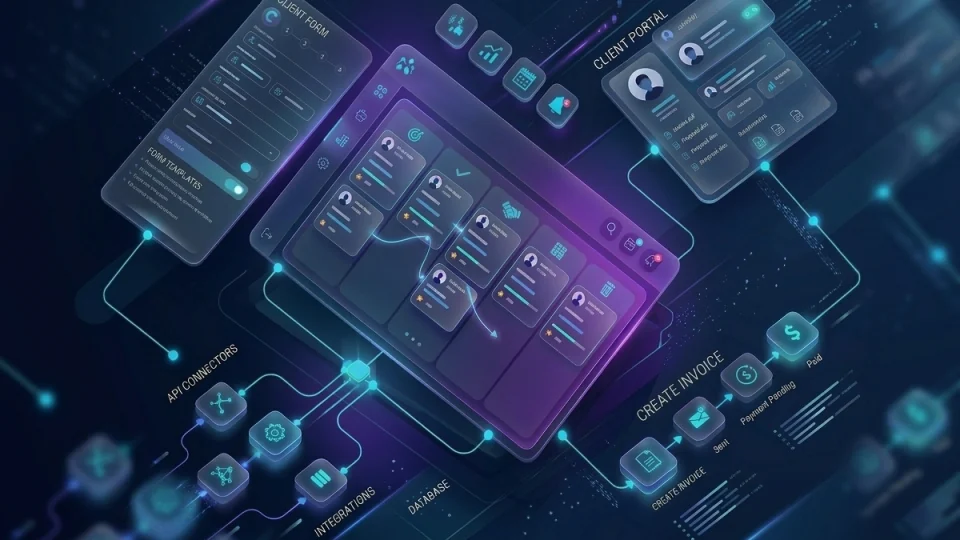
Illustration of business systems, portals, and operational flows

Capability illustration

Scenarios

Common situations

Signals that this service may be the right starting point.

Outdated or unused CRM

What usually happens
The pipeline exists on paper, but sales still use spreadsheets and leadership does not trust the numbers.
What we would examine
Actual adoption, critical fields, missing integrations, and sales processes the system should reflect.

Operations without a central system

What usually happens
Inventory, orders, or services run on loose files and each area keeps its own version of the truth.
What we would examine
Core processes, master data, key users, and minimum requirements for a management system.

Missing client or supplier portals

What usually happens
Inquiries, documents, and order status depend on emails and calls that overload the internal team.
What we would examine
External user journeys, exposed data, authentication, and what can move to self-service.

Microsoft 365 without governance or adoption

What usually happens
The company pays for licenses, but SharePoint, Teams, and access are messy and underused.
What we would examine
Tenant, permissions, active sites, collaboration patterns, and gaps against real processes.

Assessment

What we review during discovery

Items that typically enter initial assessment scope.

  • Critical sales, operational, and administrative processes
  • Master data sources and current quality
  • Current tools, contracts, and potential lock-in
  • Required integrations between sales, operations, and finance
  • User profiles, permissions, and required traceability
  • Internal or external portal requirements
  • Cloud or hybrid infrastructure to support the solution
  • Team adoption and training plan

Before and after

What changes with discipline

Before

  • Duplicated or incomplete customer data
  • Orders and status tracked through scattered messages
  • Inconsistent sales reporting
  • Scattered collaboration without clear governance

After

  • CRM or central system with reliable data
  • Portals or shared views for clients and team
  • Integrations that reduce double entry
  • Microsoft 365 organized for daily work

We select platform and scope based on your operation, not a rigid catalog. Azure and Microsoft 365 enable the solution when they fit the context.

Fit

Who it is for — and who it is not

Good fit

  • Companies that need sales, operations, or service organized in one place
  • Teams already on Microsoft 365 who want it to become a useful platform
  • Organizations that need portals for clients, suppliers, or staff
  • Businesses ready to define processes before configuring software

Clear boundaries

  • We do not sell licenses detached from implementation context
  • Large migrations without a planned window require explicit phases and testing
  • If the process is unstable, we recommend ordering it before a big rollout

Scope

What a typical project includes

  1. 01Functional and technical requirements gathering
  2. 02Architecture and data model design
  3. 03CRM, ERP, or portal configuration or development
  4. 04Integrations with existing systems
  5. 05Controlled master-data migration
  6. 06Training, go-live, and stabilization support

Capabilities

Related capabilities

  • Azure and Microsoft 365
  • Power Platform
  • Cloud services
  • Remote work and remote solutions

Deliverables

What you can expect to receive

  • Configured system or deployed application per scope
  • Documented data model and permissions
  • Operational integrations between agreed platforms
  • Functional internal or external portal where applicable
  • Critical data migration with validation
  • Operational manuals and administration guides
  • Role-based adoption plan
  • Post-go-live stabilization report

Methodology

How we deliver this service

  1. 01

    Process before screens

    We align business flows and master data before configuring modules or building screens.

  2. 02

    Solution design

    We define architecture, integrations, permissions, and success criteria with key stakeholders.

  3. 03

    Incremental build

    We deliver modules or features in short cycles with real user testing.

  4. 04

    Controlled migration

    We move critical data with validations, planned rollback, and agreed windows.

  5. 05

    Adoption and stabilization

    We train, monitor early incidents, and adjust before closing out.

FAQ

Questions about this service

Do you implement custom CRM and ERP?

We work with configuration of established platforms, low-code extensions, and custom development when the process requires it. We do not promise a generic ERP that solves everything without defined scope. We start with modules or processes with the highest impact—sales, operations, inventory, or service—and expand in phases based on adoption and budget.

What role does Microsoft 365 play in your projects?

It is a frequent enabler—identity, collaboration, SharePoint, Teams, and Power Platform can support light CRM, portals, or operational flows. We do not present it as an automatic substitute for a full management system. We assess what can live in M365 and what needs another platform or specific development to avoid awkward fits.

Can you integrate with what we already have?

Yes, when there are reasonable APIs, connectors, or exchange points. We map which data must flow, how often, and who owns each system. If integration is fragile or costly, we also propose simplifying the process before building complex bridges. The goal is reliable operation, not a pretty diagram.

How long does an enterprise systems project take?

A scoped portal or focused CRM can take weeks; a broader rollout with migrations and integrations is measured in months. We define phases with visible deliverables so value is not deferred to the end. Timeline depends on data quality, client team availability, and integration complexity.

Do you help with data migration?

Yes, with a controlled approach: field mapping, prior cleanup, test-environment runs, and validation with key users before cutover. We avoid big-bang migrations without a rollback plan. If historical data is heavily degraded, we agree what migrates, what is archived, and what is recaptured.

Do you offer support after go-live?

We can provide stabilization, evolutionary improvements, and administration under separate service agreements. We deliver documentation so an internal team or local provider can operate. Post-go-live support is sized by system criticality and client team maturity.

Do you work with SMEs in Colombia?

Yes, it is our usual context—growing businesses that need serious systems without large-corporate bureaucracy. We adjust scope, phases, and platform to actual business size. We prefer projects with an internal sponsor who can decide and validate processes with us.

How much does it cost to implement a CRM, ERP, or business system?

It depends on users, modules, processes, data migration, integrations, customization, and required support. A CRM implementation focused on sales follow-up can be much smaller than a system connecting several departments. The estimate should start with actual processes and data rather than only the number of licenses.

View more questions
How do we know whether we need a CRM, ERP, or custom application?

A CRM typically organizes customer relationships, opportunities, and follow-up. An ERP connects broader operational and administrative processes. A custom application can make sense when a differentiated workflow is not handled well by standard products. Before selecting a solution, the process and existing technology should be reviewed.

Can you implement portals for customers, suppliers, or employees?

Yes. A portal can centralize requests, documents, status information, approvals, or information exchange when identity, permissions, and data sources are properly defined. It can be integrated with existing systems rather than becoming another isolated application.

Do you work with SharePoint, Microsoft 365, and Power Platform for internal processes?

Yes, when those tools fit the use case. They can support collaboration, documents, forms, applications, and automation, but the solution must consider permissions, governance, licensing, and maintenance. Not every process needs to be built on the same platform.

Can you connect CRM, ERP, billing, inventory, and other systems through APIs?

Yes, when the products involved provide APIs, connectors, or reliable data-exchange methods. Identifiers, business rules, refresh frequency, and error handling should be reviewed first. If a legacy system has limitations, integration can be designed in phases rather than automatically replacing it.

How are data migrated from Excel or a legacy system into a CRM or ERP?

The sources, fields, duplicates, formats, and business rules that must be preserved are identified first. The information is then cleaned and transformed before being loaded and validated in the new system. Moving all historical data without reviewing its quality can transfer old problems into a new platform.

Can a new system be implemented without stopping the entire operation?

In many cases yes, through preparation, testing, controlled migrations, and a planned transition. The level of disruption depends on existing dependencies and whether both systems can operate temporarily in parallel. The transition plan should clearly define when and under what conditions the new environment becomes authoritative.

How can a CRM or ERP avoid becoming another tool that nobody uses?

The implementation should reflect real processes, reduce work instead of duplicating it, and define ownership for each type of data. Training, user testing, and decisions about required information are also important. Adoption is not solved simply by installing the platform.

Who should own the data inside a business system?

Ownership should normally belong to the business area that understands and uses the information, even when IT administers the platform. Defining data owners helps resolve inconsistencies, permissions, quality, and rule changes. Without clear ownership, different areas may end up using different definitions for the same information.

Technologies

Frequent platforms and tools

  • Microsoft 365
  • Microsoft Azure
  • SharePoint
  • Microsoft Teams
  • Entra ID
  • Power Apps
  • Power Automate
  • Power Platform

Do your teams share the same information?

Tell us which system is missing or unused and we will assess CRM, management, or portal scope realistically.

Chat on WhatsApp

Contact

Contact us

Reach our team on the channel you prefer. Tell us what you want to improve and we will guide the next step.

WhatsApp

Message us directly to discuss your requirement or project.

Open WhatsApp

Phone

Call our team during regular business hours.

+57 322 810 0001

Call now

Email

Send us the details of your question or project.

info@orqui.tech

Send email

Bogotá office

Carrera 62 #98B-22, Office 302A, Bogotá, Colombia

Get directions
· FREE ISO 27001 REVIEW ·